ABC Notation is a text-based music notation system that has become the de-facto notation for traditional music of the British Isles (and some of Europe). Used almost universally by popular websites such as The Session, FolkTuneFinder and irishtune.info, its easy to understand syntax makes transcribing short melodies quick and simple. So if you’re looking to transcribe tunes of your own into ABC Notation, or compile your own tunebooks, look no further!
Software

Owing to ABC notation’s opensource nature, there are many programs for converting ABC notation into staff notation. A very comprehensive list can be found on abcnotation.com which gives the prices and capabilities of software available. However, for the purposes of this tutorial, I will be using EasyABC, which can be installed here. True to it’s name, it should pose little issue to get it up and running!
The Notation
Now that you’ve got somewhere to write ABC notation, time to learn what it actually is. At it’s core, ABC notation is simply writing out the letter names of the notes you want to notate. In order to differentiate octaves, a system of capitals and lower cases is used, as shown below. Rests are represented with a lower case “z”.
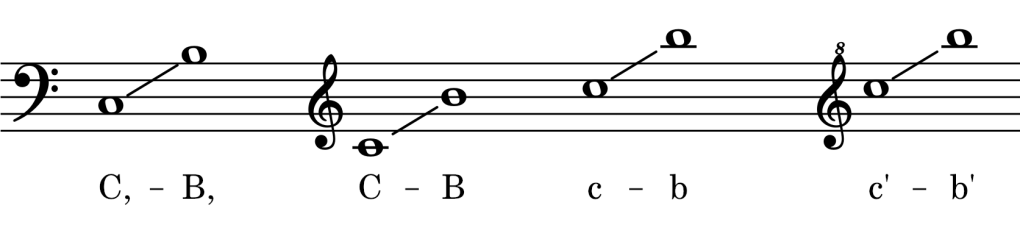
Note length is indicated as multiples of a set “unit” note value. The default “unit” note value is a quaver (or 1/8 note), and applies to just a letter name by itself. So writing “C” would denote a middle C for a single quaver. To write longer notes, a number is written after the letter name, so “C2” would be a crotchet (1/4 note) and “C4” a minim (1/2 note). To write shorter notes, a fraction is put after the letter name, so “C/2” would be a semiquaver (1/16 note) and so on.
Anatomy of EasyABC
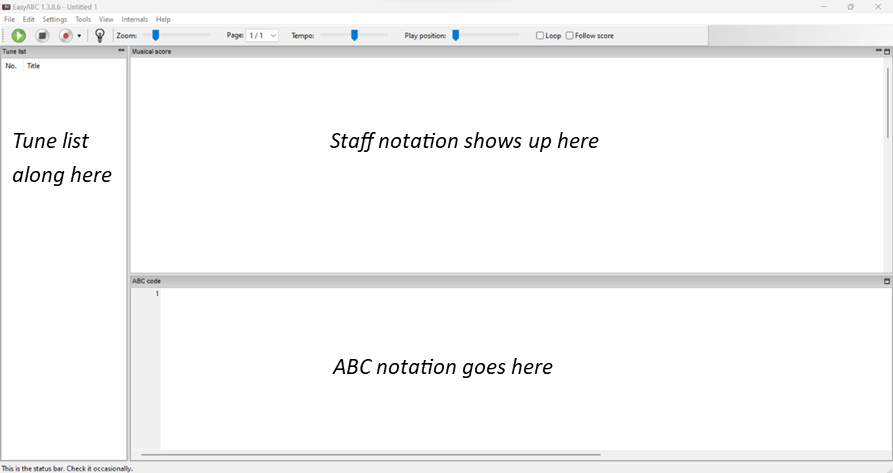
Opening up EasyABC, you are greeted with three panels. The largest is where your finished music notation will appear, and directly below it is a text window for writing the ABC Notation itself. Then along the left-hand side of the screen is a panel listing tunes in your ABC file: EasyABC is often used to make tunebooks, with many tunes in one document, and this feature makes that much easier. Along the top are a few options for playback.
Let’s get writing!
Before you can jump write(!) in, there are some required headers for ABC notation to appear. The first is the “X:” field, which denotes the number of the tune in the document (again, this is only really important in a document with lots of tunes). Since this is the first tune in our document, we will just write 1
The second is the “K:” field, which denotes the key signature. To keep it simple, I’ll just use C.
Now you can write out a tune, with the default unit note length of a quaver. You’ll notice I haven’t mentioned time signature. This is because it isn’t strictly required: you just write barlines wherever you want with the “|” (vertical bar) character. Here’s the melody of “Mary had a little lamb”, written out in this pared-down style.
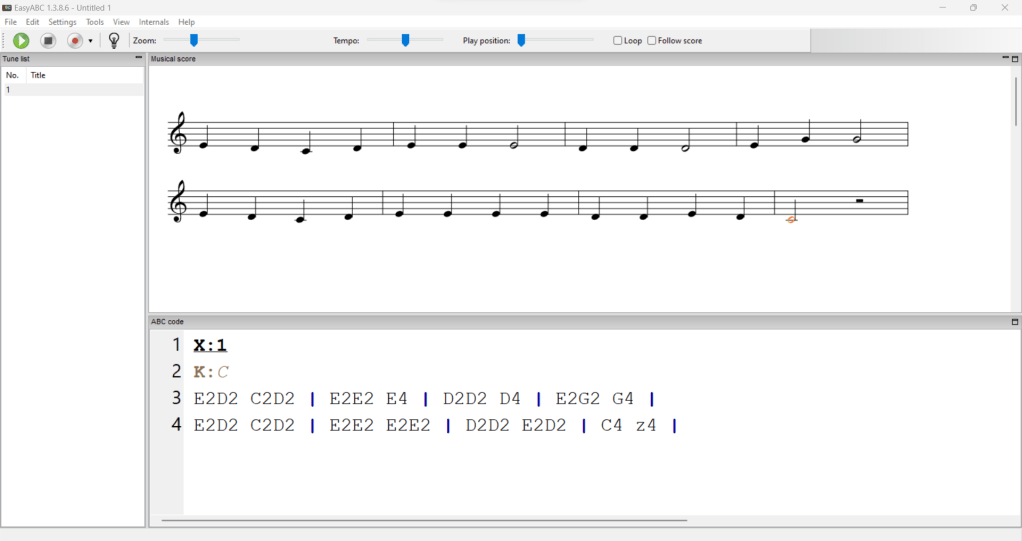
You’ll notice that I’ve put spaces at the halfway point of the bar, this is just for readability, since I find it personally helpful, so feel free to format your spaces however you find best. The line breaks, however, actually tell EasyABC where to put line breaks in the staff notation, so those have a more direct purpose. Most simple music comes in 2, 4 or 8 bar phrases, and it aids readability to fit one phrase per line.
Thanks for reading. Next time we will look at adding some more header fields to our “Mary had a Little Lamb”, and adding lyrics and chords!
 lankfish
Leave a comment